Avnac
The free alternative toCanva Pro
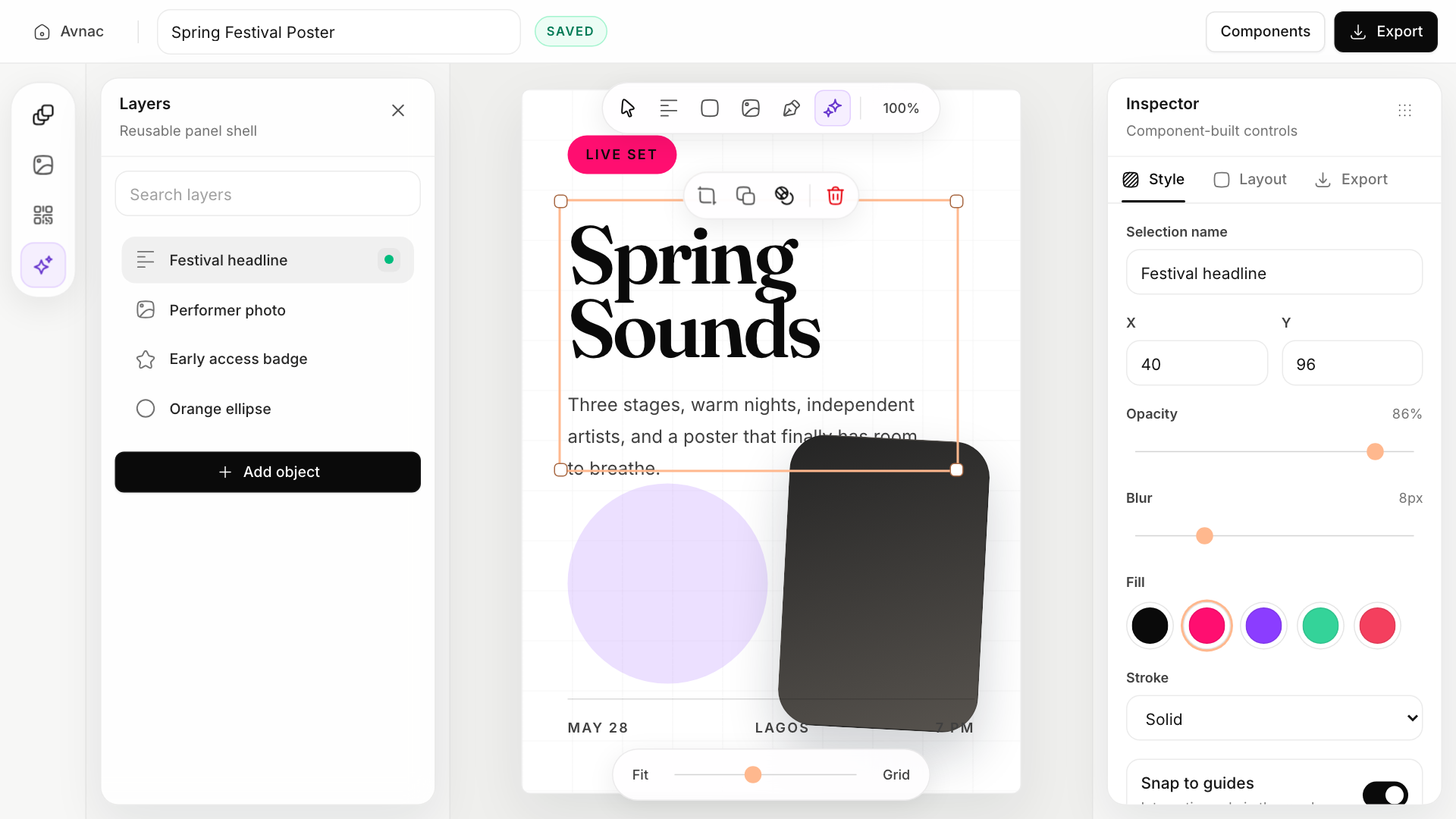
Avnac is a Canva-style visual editor, open and lightweight: go to avnac.design, click “Open editor” and you are in. No account, no email, nothing to install. You place text, shapes, images and vectors, align, rotate, add shadows, crop, even generate a QR code, then export to PNG, JPG or WebP. Your projects stay in your browser's local storage, so on your machine. You can also run it locally or on your VPS. AGPL-3.0 licence. Before dropping Canva Pro: there is no template or photo library, you start from a blank canvas, the editor is blocked on phones, and the project is young: its main repo has not moved since May 2026.
Versus Canva Pro: the match
Price
Avnac
€0, in the browser
Canva Pro
€12 a month, €110 yearly
Account
Avnac
None, you open the page and create
Canva Pro
Required
Where your files live
Avnac
In your browser, on your machine
Canva Pro
With them
| VS | Avnac | Canva Pro ↗ |
|---|---|---|
| Price | €0, in the browser | €12 a month, €110 yearly |
| Account | None, you open the page and create | Required |
| Where your files live | In your browser, on your machine | With them |
| Templates and stock images | None, blank canvas | Millions, that is their strength |
| Export | PNG, JPG, WebP, transparent background included | Transparent background is Pro only |
| On a phone | No, desktop only | Yes, mobile app |
How to install it (even from zero)
Nothing to install: the editor is online, no account. The prompt below is only for when you want your own copy on your server, for instance for your team.
- 1
Open the editor, that is all
Go to avnac.design/editor. No account: you create, you export. Your projects stay in your browser, remember to export what matters.
- 2
If you want your own copy, paste this prompt into Claude
It fetches the official project and runs it on your machine or your server, interface and small backend included:
Installe Avnac (l'éditeur de visuels open source façon Canva, repo GitHub xt42io/avnac) sur ma machine, en suivant le README du dépôt. Pars de zéro : vérifie que Git et Node.js (version 20 ou plus) sont installés, sinon installe-les. Clone le dépôt, puis dans le dossier backend fais npm install, copie .env.example en .env et lance npm run dev (port 3001) ; dans le dossier frontend fais npm install et lance npm run dev (port 3300). Ouvre http://localhost:3300 et vérifie qu'on peut créer un visuel avec un texte et une forme, puis l'exporter en PNG. Si je veux le mettre sur mon serveur pour mon équipe, construis le frontend avec npm run build, sers-le derrière un reverse proxy Caddy en HTTPS avec le backend, et explique-moi comment le mettre à jour. Explique chaque étape simplement, je débute.

Review the GitHub repository and check whether it is safe to install given my machine and my infrastructure. Ask me as many questions as possible, using widgets, to clarify my request and be as precise as you can.
 If you want your own copy, paste this prompt into Claude
What you actually do with it
A thumbnail, a story, a poster, right now
You open the tab, place your title and image, export. No login, no “upgrade” at export time.
Visuals with clean text and sharp vectors
Text hierarchy, alignment, shadows, vector shapes that stay sharp when zoomed. For a cover or a carousel, it is enough.
A QR code on your flyer, without a third-party site
The QR code generator is built in: paste your link, place it on the visual, export.
Project health, at a glance
Before installing an open-source tool, one question matters: is the project alive? These scores are computed from public GitHub data. They are not made up.
30/100
Watch closelyLow-activity project: fine to try, don’t build your house on it.
- Activity
- 0
Is the code moving? (commits in the last 30 days)
- Maintenance
- 40
How fresh is the latest update? Fresher is better.
- Community
- 54
Stars and contributors: people around means help and fixes.
- Maturity
- 55
Project age. Old enough to be solid, still alive.
- Momentum
- 0
Current pace versus its usual pace: speeding up or dozing off?
The repo in numbers
- GitHub stars
- 1.6k
- Forks
- 201
- Contributors
- 8
- Commits
- 696
- Project age
- 0.5 yrs
- Last commit
- 173 d ago
- Size
- 1.1 MB
- License
- AGPL-3.0
Built with
- TypeScript 96.3%
- CSS 3.1%
Scores computed automatically from the GitHub API (last-30-days activity, update freshness, community size, project age). Refreshed daily.

Loucash’s take
6/10
Avnac's real argument is zero friction: you click a link and you are creating, no account, nothing to install, and your files do not leave your machine. For a title on an image, a story, a simple poster, it is faster than opening Canva. But let us be honest about what it is not. You mostly pay Canva for its templates and its image and photo library. Avnac has none: you start from a blank canvas with your own images. No mobile app either, and the project is young, 1,500 stars, run by one person, with a main repo that has not moved since May 2026. A desktop fork, Avnac Studio, takes over for those who want a native app. My take: if you pay Canva for visuals you build yourself, Avnac gives you the subscription back. If you pay it for the templates, keep Canva, or look at Penpot for more advanced design.
It’s for you if: You make your own visuals, on a desktop, with your own images, and you want an open editor without an account rather than a subscription.
Also worth a look in the library
PhotoCraft
Content & social€27/moThe open source Photoshop, rewritten from scratch: layers, masks, adjustment layers, styles, type, vectors, brushes and real PSD files. Free, offline and with no account, still in alpha.
View details →
FilmCraft
Content & social€27/moThe open source Premiere Pro, rewritten from scratch: multitrack timeline, trims, Lumetri-style grading, effects, audio mixing, captions and export. Free, with no account, still in alpha.
View details →
VectorCraft
Content & social€27/moThe open source Illustrator, rewritten from scratch: pen, Pathfinder, Shape Builder, gradients, type, layers, and SVG, PDF and PDF-compatible .ai files. Free, with no account, still in alpha.
View details →



One email a week that saves you money
Every Tuesday: the open source alternatives that just entered the library, what they replace and what they save you. One email, nothing more.
Free. One email on Tuesdays. Unsubscribe in one click. Your data


Join the Tuesday readers
