
Excalidraw
NewThe free alternative toWhimsical

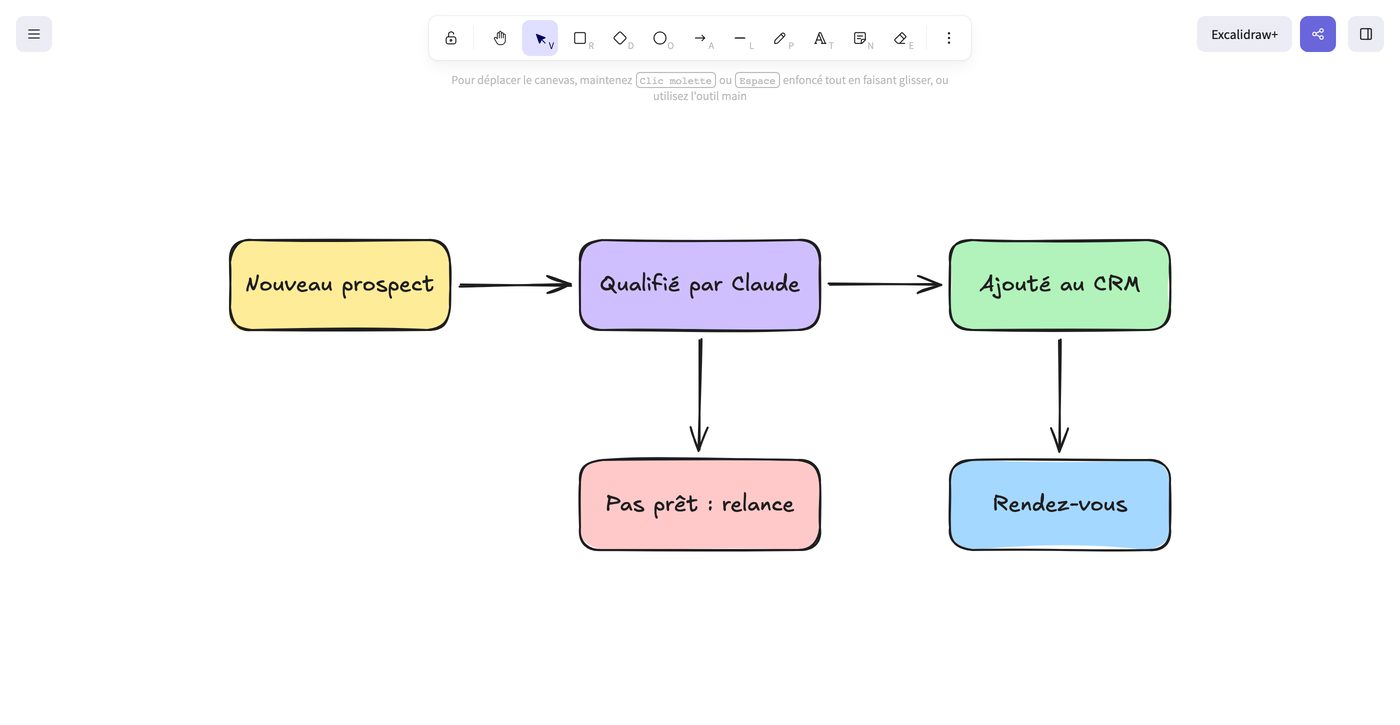
Excalidraw is the whiteboard everyone ends up using: more than 130,000 stars on GitHub, close to 400 contributors, an MIT licence, and it is built into Notion, Obsidian and Google Cloud's tools. You open excalidraw.com and draw, no account needed: rectangles, diamonds, arrows that stay attached to shapes when you move them, text, images, and ready made shape libraries, including wireframe kits. The hand drawn style can be tuned, from clean to sketchy, and the interface speaks French. Working together is free: you share a link, everyone draws live, and the content is end to end encrypted. PNG or SVG exports, with no watermark. The detail that changes everything with Claude: Excalidraw imports diagrams written in Mermaid. You ask Claude for your sales process, it writes it, you paste it, and it becomes a drawing you touch up by hand. One limit to know: the free version keeps a single drawing at a time in your browser. To keep several, you save them as files, or go through Obsidian's Excalidraw plugin. The Excalidraw+ plan, about €5 a month, adds unlimited online saving and team folders. And you can host it yourself with Docker.
Versus Whimsical: the match
Price
Excalidraw
€0, no account
Whimsical
€10/month per editor
What you can create
Excalidraw
Unlimited
Whimsical
50 objects a month for free
Exports
Excalidraw
PNG and SVG with no watermark
Whimsical
Watermark on the free plan
| VS | Excalidraw | Whimsical ↗ |
|---|---|---|
| Price | €0, no account | €10/month per editor |
| What you can create | Unlimited | 50 objects a month for free |
| Exports | PNG and SVG with no watermark | Watermark on the free plan |
| Live collaboration | Free, end to end encrypted | Yes |
| Keeping your drawings | One in the browser, as many as you want as files | Everything in their cloud |
| From Claude | Mermaid import: Claude writes, you touch up | In house AI |
| Docs and mind maps | No docs, mind maps by hand | Built in docs and mind maps |
How to install it (even from zero)
Nothing to install: excalidraw.com opens in the browser, no account. The prompt shows you the useful moves, how to keep your drawings, and, if you want, the install on your own server.
- 1
Paste this prompt into Claude (Code or Desktop)
It gets you going with the tool, then draws your first diagram with Mermaid:
Je veux remplacer Whimsical par Excalidraw, le tableau blanc open source (dépôt GitHub excalidraw/excalidraw, site excalidraw.com). Montre-moi d'abord la version en ligne, gratuite et sans compte : dessiner un schéma, accrocher des flèches aux formes, utiliser les bibliothèques de formes, travailler à plusieurs en direct et exporter en PNG ou en SVG. Explique-moi comment garder mes dessins, puisque la version gratuite n'en sauvegarde qu'un à la fois dans le navigateur : enregistrement en fichier .excalidraw, ou plugin Excalidraw pour Obsidian. Si je veux l'héberger moi-même, installe-le sur mon serveur avec le Dockerfile du dépôt excalidraw/excalidraw, et dis-moi ce qu'il faut ajouter (le serveur excalidraw/excalidraw-room) pour que la collaboration en direct reste chez moi. Enfin, demande-moi un processus de mon entreprise, écris-le en Mermaid et montre-moi comment l'importer dans Excalidraw pour le retoucher à la main.

Review the GitHub repository and check whether it is safe to install given my machine and my infrastructure. Ask me as many questions as possible, using widgets, to clarify my request and be as precise as you can.
- 2
Have Claude write your diagrams
Describe your process to Claude, ask for Mermaid, paste it into Excalidraw: you start from a clean diagram instead of a blank page.
- 3
Keep your drawings in Obsidian
With the Excalidraw plugin, each diagram becomes a note in your second brain, linked to the rest. No more drawings lost in a tab.
 Paste this prompt into Claude (Code or Desktop)
What you actually do with it
Your diagrams with no object counter
Whimsical's free plan stops at 50 objects a month. Here you draw as much as you want, and your exports come out with no watermark.
A group workshop in one link
You share a link, your team or your client draws with you live, without creating an account. The content is end to end encrypted.
Claude draws, you touch up
Org chart, customer journey, app architecture: Claude writes it in Mermaid, Excalidraw turns it into an editable drawing.
Project health, at a glance
Before installing an open-source tool, one question matters: is the project alive? These scores are computed from public GitHub data. They are not made up.
80/100
ExcellentVery active, well-maintained project: go ahead with confidence.
- Activity
- 80
- Maintenance
- 100
- Community
- 100
- Maturity
- 100
- Momentum
- 19
Is the code moving? (commits in the last 30 days)
How fresh is the latest update? Fresher is better.
Stars and contributors: people around means help and fixes.
Project age. Old enough to be solid, still alive.
Current pace versus its usual pace: speeding up or dozing off?
The repo in numbers
- GitHub stars
- 132.7k
- Forks
- 15.4k
- Contributors
- 357
- Commits
- 4.1k
- Project age
- 6.7 yrs
- Last commit
- today
- Size
- 102.1 MB
- License
- MIT
Built with
- TypeScript 94.8%
- SCSS 2.5%
- MDX 1.6%
- JavaScript 1.1%
Scores computed automatically from the GitHub API (last-30-days activity, update freshness, community size, project age). Refreshed daily.

Loucash’s take
8/10
Excalidraw is one of the few free tools that clearly beat their paid competitor. Whimsical for free means 50 objects a month and a watermark: enough to try, not enough to work. Excalidraw is unlimited, needs no account, and works live with others. What I love: the Mermaid import. I describe a process to Claude, it gives me the diagram, I paste it, and in ten seconds I have a drawing that would have taken me twenty minutes. With the Obsidian plugin, my diagrams live in my second brain next to my notes. What may bite: the hand drawn style does not please everyone in a client meeting, even though it can be tuned. The free version keeps only one drawing at a time in the browser, so you need the habit of saving. And if you live in Whimsical's docs and mind maps, Excalidraw does not replace them.
It’s for you if: You make diagrams, flows or quick wireframes, alone or in workshops, and you pay for Whimsical mostly to get past the object limit. If your team relies on Whimsical's docs and mind maps, keep it.
Also worth a look in the library
OpenCut
Content & social€24/moThe open source video editor that takes on CapCut: multitrack timeline, masks, keyframes, automatic captions, watermark free MP4 export, right in your browser. Your videos never leave your machine, and there is no account and no subscription.
View details →
Penpot
Content & social€20/moNewThe open source design tool that replaces Figma: mockups, clickable prototypes, component libraries, live collaboration. The online version is free and complete, with no file counter, and you can host it on your own server.
View details →
Postiz
Content & social€20/moSchedule your posts and track your Instagram/TikTok stats, self-hosted. The others charge per channel AND per feature: this one is genuinely free.
View details →



One email a week that saves you money
Every Tuesday: the open source alternatives that just entered the library, what they replace and what they save you. One email, nothing more.
Free. One email on Tuesdays. Unsubscribe in one click.


Join the Tuesday readers
