
LibreCrawl
The free alternative toScreaming Frog SEO Spider

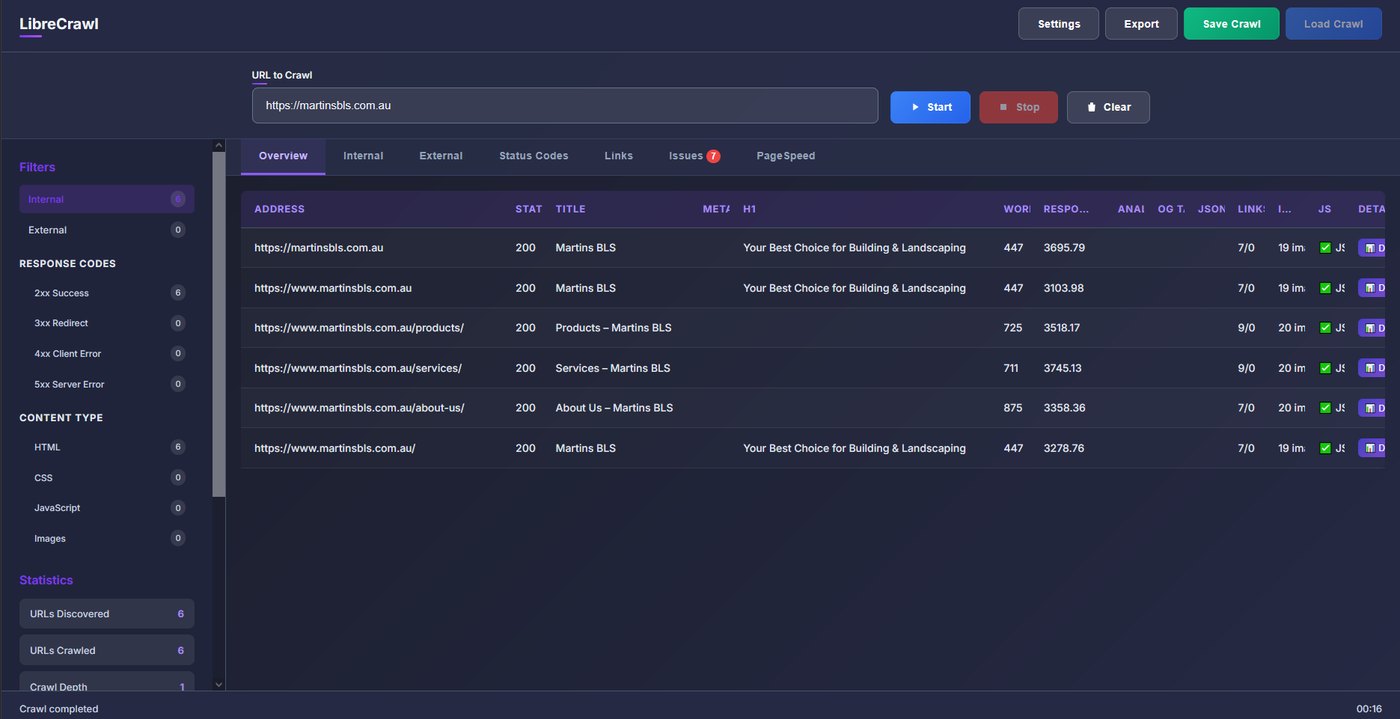
LibreCrawl is Screaming Frog without the licence. You give it your site's address, it visits every page and returns what an SEO audit needs: missing or duplicate titles and meta descriptions, headings, broken links, redirect chains, images without alt text, canonicals, sitemap. It renders JavaScript (React, Vue, Angular sites) with a real browser, measures Core Web Vitals through PageSpeed Insights, and exports everything as CSV, Excel, JSON or XML. A plugin workshop lets you add your own analyses. It is Python with a web interface, local or on a server, MIT licence. Screaming Frog stops at 500 URLs on the free tier; here there is no limit, the project reports crawls of over a million URLs. One precaution: the project is young.
Versus Screaming Frog SEO Spider: the match
Price
LibreCrawl
€0, on your machine or your server
Screaming Frog SEO Spider
279 dollars a year, free tier capped at 500 URLs
URL limit
LibreCrawl
None, crawls of over a million URLs
Screaming Frog SEO Spider
500 on free, unlimited with the licence
JavaScript rendering
LibreCrawl
Included, with a real Chromium
Screaming Frog SEO Spider
Licence only
| VS | LibreCrawl | Screaming Frog SEO Spider ↗ |
|---|---|---|
| Price | €0, on your machine or your server | 279 dollars a year, free tier capped at 500 URLs |
| URL limit | None, crawls of over a million URLs | 500 on free, unlimited with the licence |
| JavaScript rendering | Included, with a real Chromium | Licence only |
| Core Web Vitals | PageSpeed Insights built in | With the licence, through the PageSpeed API |
| Exports | CSV, Excel, JSON, XML, no limit | Capped on free |
| Where it runs | Web interface, local or on a shared server | Desktop app, one licence per person |
How to install it (even from zero)
Two ways: Docker in three commands, or Python locally. The prompt picks according to your machine, installs what is missing and opens the interface on port 5000.
- 1
Paste this prompt into Claude (Code or Desktop)
It checks what you have, installs LibreCrawl from the official repository and runs a first test crawl:
Installe LibreCrawl sur ma machine (crawler SEO open source, dépôt GitHub PhialsBasement/LibreCrawl, site librecrawl.com) en suivant son README. Vérifie d'abord ce que j'ai. Si Docker est installé : clone le dépôt, copie le fichier .env.example en .env et lance docker compose up -d. Sinon : installe Python 3 si besoin, crée un environnement virtuel, installe les dépendances de requirements.txt, lance playwright install chromium puis python main.py --local. Ouvre ensuite http://localhost:5000 et vérifie que la page répond. Fais un premier crawl de test sur une petite page pour confirmer que tout marche, avec le rendu JavaScript activé. Si c'est un serveur exposé sur internet, protège l'accès (mot de passe ou reverse proxy avec authentification) avant de me donner l'adresse.

Review the GitHub repository and check whether it is safe to install given my machine and my infrastructure. Ask me as many questions as possible, using widgets, to clarify my request and be as precise as you can.
- 2
Run your first real crawl
Paste your site's address, keep JavaScript rendering if your site relies on it, and read the tabs: pages, links, detected issues, Core Web Vitals.
- 3
Export and fix in order
Export the issues as Excel or CSV, sort by severity, and start with missing titles, broken links and redirect chains: those are the quick wins.
 Paste this prompt into Claude (Code or Desktop)
What you actually do with it
Audit your site before a redesign
A full crawl gives you the list of pages, their titles, their inbound links: you know what to keep, redirect or delete.
Find a client site's broken links
404s, redirect chains, images without alt text: a clean export to send over, without buying a licence for a one-off audit.
Follow a site after a migration
You rerun the crawl every week and compare the exports: vanished pages and missing redirects stand out.
Project health, at a glance
Before installing an open-source tool, one question matters: is the project alive? These scores are computed from public GitHub data. They are not made up.
37/100
Watch closelyLow-activity project: fine to try, don’t build your house on it.
- Activity
- 0
Is the code moving? (commits in the last 30 days)
- Maintenance
- 60
How fresh is the latest update? Fresher is better.
- Community
- 53
Stars and contributors: people around means help and fixes.
- Maturity
- 70
Project age. Old enough to be solid, still alive.
- Momentum
- 0
Current pace versus its usual pace: speeding up or dozing off?
The repo in numbers
- GitHub stars
- 1.1k
- Forks
- 223
- Contributors
- 11
- Commits
- 109
- Project age
- 1.1 yrs
- Last commit
- 33 d ago
- Size
- 0.4 MB
- License
- MIT
Built with
- Python 50.4%
- JavaScript 28.7%
- HTML 16.2%
- CSS 3.8%
- Shell 0.5%
Scores computed automatically from the GitHub API (last-30-days activity, update freshness, community size, project age). Refreshed daily.

Loucash’s take
7/10
If you pay for Screaming Frog to crawl more than 500 pages, LibreCrawl does the job without the licence: same basic checks, JavaScript rendering, Core Web Vitals, unlimited exports. For a site audit, a migration or a monthly follow-up, you have what you need. What I like: the web interface you can share on a server for the whole team, the absence of a cap, and a project that fixes fast, with close to 1,000 stars in a year. What may bite: it is young, carried by a small number of people, with no numbered release; Screaming Frog's advanced reports (fine custom extraction, crawl comparison) are less polished; and the PageSpeed API has its quotas. For regular professional use, keep an eye on the repository's activity.
It’s for you if: You do SEO for yourself or for clients and you do not want to pay a yearly licence to crawl more than 500 pages.
Also worth a look in the library
OpenSEO
Data & analytics€134/moThe open source SEO tool that does the job of Semrush and Ahrefs: keyword research, backlinks, rank tracking, site audit, visibility in AI answers. The software is free and self-hosted; the SEO data is pay as you go, a few cents per request, no subscription.
View details →
Casdoor
Data & analytics€31/moThe open source sign in server that replaces Auth0: a login page in your colours, sign in with Google and about a hundred others, two factor authentication, enterprise SSO. Your user accounts stay on your server, with no bill that grows with them.
View details →
PocketBase
Data & analytics€22/moA complete backend in a single file: SQLite database, user accounts, files, realtime and an admin dashboard. You run it on your server and get the equivalent of Supabase or Firebase, with no subscription.
View details →



One email a week that saves you money
Every Tuesday: the open source alternatives that just entered the library, what they replace and what they save you. One email, nothing more.
Free. One email on Tuesdays. Unsubscribe in one click. Your data


Join the Tuesday readers
