
Morphic
The free alternative toPerplexity Pro

Morphic is an open source Perplexity: you ask your question, it searches, reads the pages and writes an answer with the source next to each claim. Two modes: quick for an answer in seconds, adaptive for multi-step research. You pick the model (OpenAI, Anthropic, Google, DeepSeek or a local model through Ollama) and the search engine: Tavily, Brave, Exa or SearXNG, free and bundled in the Docker install. You can use it on chat.morphic.sh, for free and without signing up. Installed on your machine, it sends nothing to the project, only to your model provider. Against Perplexity Pro, the ecosystem is missing: no mobile app, no workspaces, and answer quality depends on the model you plug in.
Versus Perplexity Pro: the match
Price
Morphic
€0 online; at home, your model (pay as you go key or local)
Perplexity Pro
about €18/month (20 dollars), about €15 yearly (17 dollars)
Sourced answers
Morphic
Yes, cited sources, images, tables
Perplexity Pro
Yes
AI model
Morphic
Your choice: OpenAI, Anthropic, Google, DeepSeek, Ollama locally
Perplexity Pro
Perplexity's, model choice reserved to Pro
| VS | Morphic | Perplexity Pro ↗ |
|---|---|---|
| Price | €0 online; at home, your model (pay as you go key or local) | about €18/month (20 dollars), about €15 yearly (17 dollars) |
| Sourced answers | Yes, cited sources, images, tables | Yes |
| AI model | Your choice: OpenAI, Anthropic, Google, DeepSeek, Ollama locally | Perplexity's, model choice reserved to Pro |
| Deep research | Adaptive mode, in several steps | Deep research, limited on the free plan |
| Where it runs | On their instance, or at home with Docker | In Perplexity's cloud |
| Account | None, guest mode | Account required for Pro |
| Code | Open, Apache-2.0 | Closed |
How to install it (even from zero)
Two ways: try it right now at chat.morphic.sh, no account, or install it at home with Docker (the search engine is included) and plug in an API key or a local model through Ollama. The prompt has you choose.
- 1
Paste this prompt into Claude (Code or Desktop)
It asks whether you want to try it online or host it, then does the Docker install and the first search with you:
Je veux utiliser Morphic (le moteur de réponses IA open source, dépôt GitHub miurla/morphic, site morphic.sh) à la place de Perplexity Pro. Demande-moi d'abord si je veux juste l'essayer sur chat.morphic.sh (gratuit, sans compte) ou l'héberger sur ma machine avec Docker. Pour Docker, guide-moi pas à pas en me posant des questions : cloner le dépôt, copier .env.local.example en .env.local, choisir le modèle d'IA (ma propre clé d'API OpenAI, Anthropic ou Google, payée à l'usage, ou Ollama en local, gratuit si ma machine a assez de mémoire), lancer docker compose up -d (PostgreSQL, Redis et SearXNG sont inclus, aucune clé de recherche à créer), ouvrir localhost:3000, choisir le modèle dans le sélecteur et faire une première recherche. Explique-moi ce qui sort de ma machine et vers qui (docs/PRIVACY.md du dépôt), comment activer l'historique et les comptes si je le souhaite, et comment mettre Morphic à jour.

Review the GitHub repository and check whether it is safe to install given my machine and my infrastructure. Ask me as many questions as possible, using widgets, to clarify my request and be as precise as you can.
- 2
Choose your model
An API key is pay as you go, a few cents per question. Ollama runs a model on your machine, free, but it needs memory and a model that can call tools.
- 3
Try the adaptive mode
For a question that needs several searches, switch from quick to adaptive mode: Morphic chains queries and cross checks sources before answering.
 Paste this prompt into Claude (Code or Desktop)
What you actually do with it
A sourced answer instead of ten tabs
One question, one written answer, the sources right there: you check in one click instead of digging through results.
Compare before buying
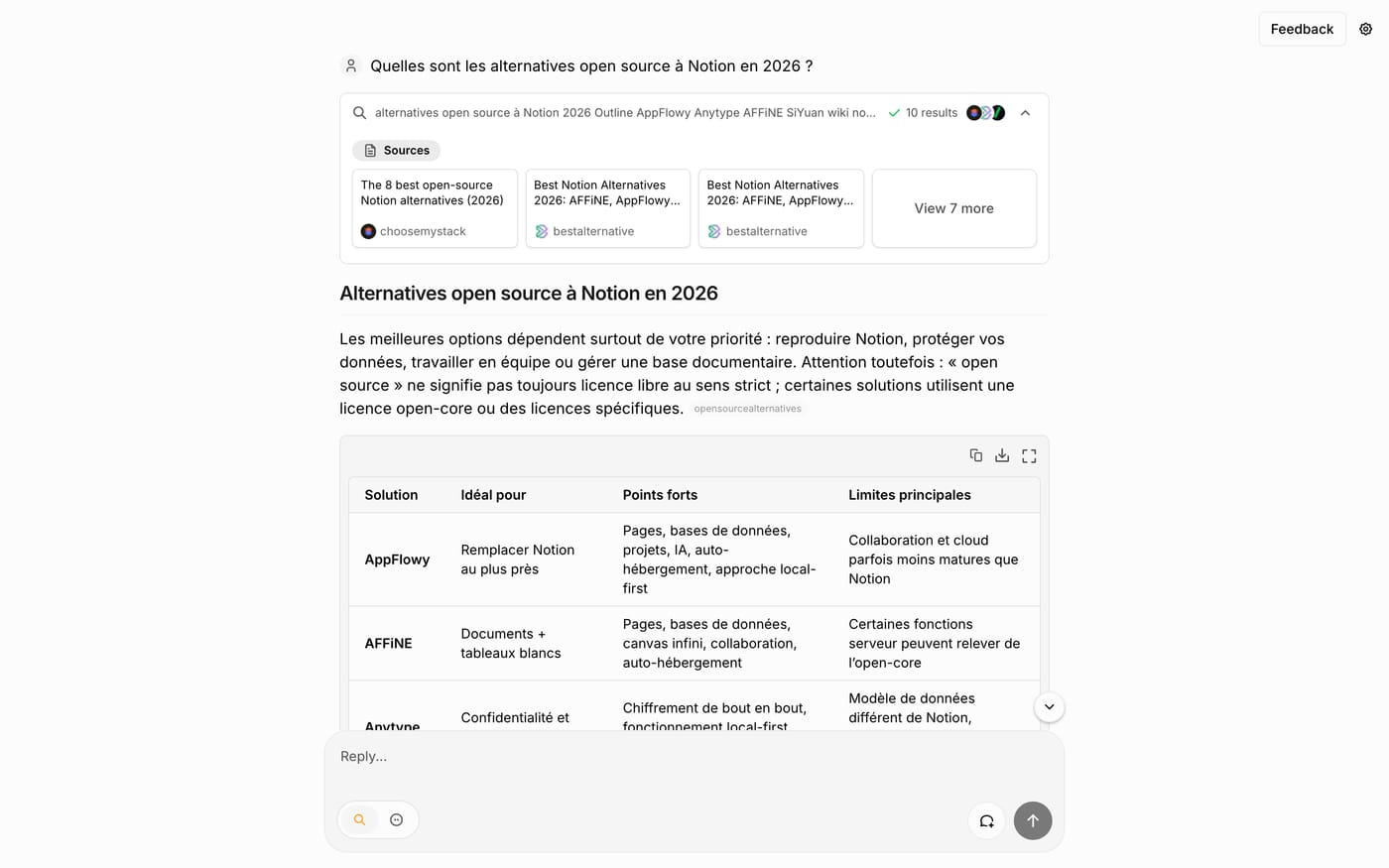
"Which open source alternatives to Notion in 2026?": Morphic produces a comparison table with licences, strengths and limits, sources included.
Your monitoring with the model you want
At home, you plug in Claude, GPT, Gemini or a local model, and switch search engines without switching tools.
Project health, at a glance
Before installing an open-source tool, one question matters: is the project alive? These scores are computed from public GitHub data. They are not made up.
80/100
ExcellentVery active, well-maintained project: go ahead with confidence.
- Activity
- 100
Is the code moving? (commits in the last 30 days)
- Maintenance
- 100
How fresh is the latest update? Fresher is better.
- Community
- 74
Stars and contributors: people around means help and fixes.
- Maturity
- 80
Project age. Old enough to be solid, still alive.
- Momentum
- 44
Current pace versus its usual pace: speeding up or dozing off?
The repo in numbers
- GitHub stars
- 9.3k
- Forks
- 2.4k
- Contributors
- 46
- Commits
- 1.9k
- Project age
- 2.6 yrs
- Last commit
- today
- Size
- 11.2 MB
- License
- Apache-2.0
Built with
- TypeScript 98.8%
- CSS 0.5%
- PLpgSQL 0.5%
Scores computed automatically from the GitHub API (last-30-days activity, update freshness, community size, project age). Refreshed daily.

Loucash’s take
7/10
I tested the online instance with a real question, in French: ten sources found, a structured answer with a comparison table and the sources cited next to each point. It is Perplexity's move, without an account and without a subscription. The project is serious: two years old, a release every month, commits every day, and a page that documents in black and white what leaves your machine when you host it. What I like: the choice of model and search engine, the adaptive mode for questions that need several searches, and the Docker install that ships its own search engine. What may bite: the online version remains a demo instance, with no guarantee on limits; at home, answer quality depends on the model you plug in, and an API key is pay as you go. No mobile app, no workspaces, no ecosystem: Perplexity keeps those. For everyday sourced research, it is more than enough.
It’s for you if: You pay Perplexity Pro to ask questions and get sourced answers, and you use neither its workspaces nor its mobile app. If you want the best model for every question without a subscription, host it and plug in your key.
Also worth a look in the library
OpenBot
Agents & orchestration€86/moNewA small team of AI agents on your computer, running on the plan you already pay for: ChatGPT, Gemini or Grok. Free for personal use only: for work, you need their license.
View details →
n8n
Agents & orchestration€27/moWire your tools together and let it run: when this happens, do that. Self-hosted, no task counter stopping you mid-month.
View details →
Paperclip
Agents & orchestration€26/moThe open source dashboard to run a team of AI agents: you hand them tasks like you would to colleagues, they work on their own on a schedule, and you approve what matters. The software is free; the AI is your Claude or ChatGPT subscription, or your API key.
View details →



One email a week that saves you money
Every Tuesday: the open source alternatives that just entered the library, what they replace and what they save you. One email, nothing more.
Free. One email on Tuesdays. Unsubscribe in one click. Your data


Join the Tuesday readers
