
Paperclip
The free alternative toLindy

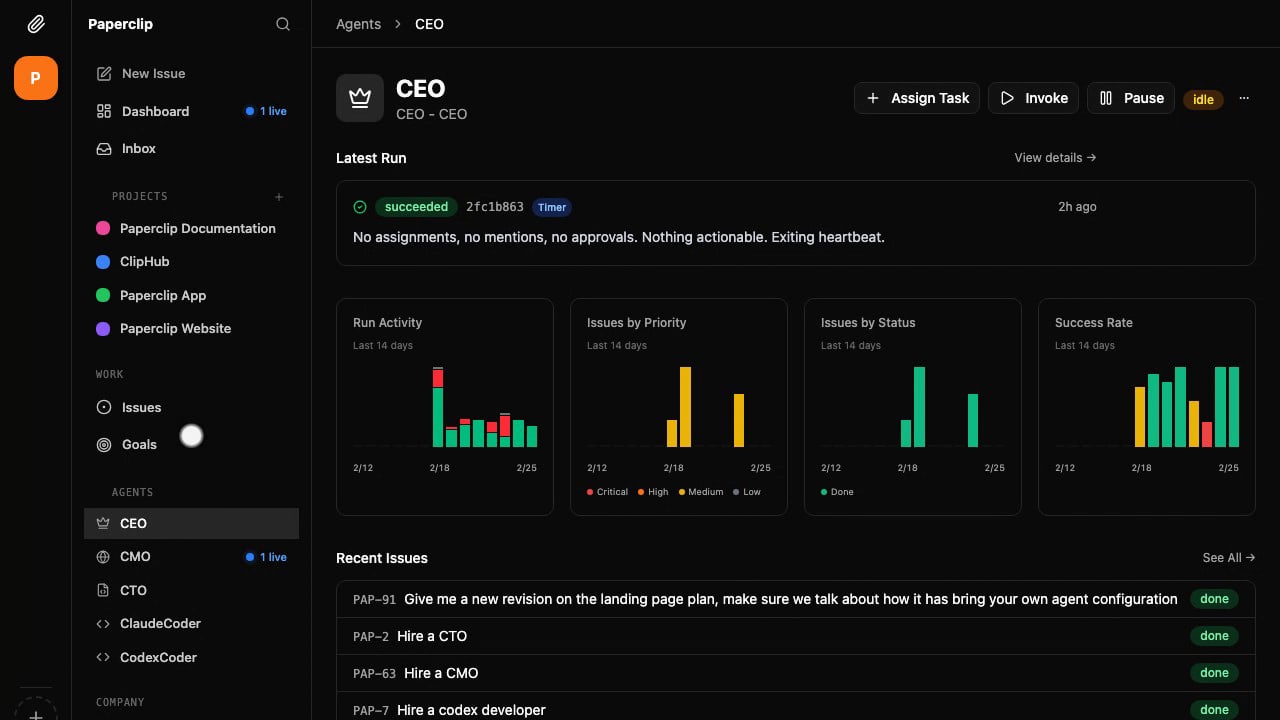
Paperclip is the open source alternative to Lindy: a team of AI agents that takes on tasks and moves forward on its own. You create your organization, set a goal and 'hire' agents (Claude Code, Codex, OpenCode, Hermes…), each with a role and a manager. You hand them tasks as in a project manager, schedule routines (Monday research, Thursday newsletter), approve their plans and see what each one uses. It runs on your Mac or your server, no account, MIT licence; the cloud version is still only a waitlist. The limit: Paperclip brings no AI. Each agent draws on your subscription or your API key, and by default a Claude agent acts on your machine without asking permission.
Versus Lindy: the match
Price
Paperclip
€0, plus your agents' subscription or API key
Lindy
€26/month per user, AI included in the credits
The AI
Paperclip
Your agents: Claude Code, Codex, OpenCode, Hermes, Cursor…
Lindy
Included, model of your choice for each task
The team
Paperclip
Several agents, with roles, an org chart and delegation
Lindy
One assistant in Slack, with over 40 skills
| VS | Paperclip | Lindy ↗ |
|---|---|---|
| Price | €0, plus your agents' subscription or API key | €26/month per user, AI included in the credits |
| The AI | Your agents: Claude Code, Codex, OpenCode, Hermes, Cursor… | Included, model of your choice for each task |
| The team | Several agents, with roles, an org chart and delegation | One assistant in Slack, with over 40 skills |
| Recurring tasks | Scheduled routines, each one leaves a task and its history | Scheduled routines |
| Your go-ahead | Plan approvals, and hire approvals if you turn them on | Built-in approvals |
| Apps | Gmail, Drive, Notion, Slack, Shopify, Zapier and any MCP server | Over 1,500 integrations |
| Where it runs | On your Mac or your server, only calls to the AI and to connected apps leave it | In Lindy's cloud |
| Code | Open, MIT licence | Closed |
How to install it (even from zero)
You need a Mac (or Linux, or Windows with WSL2), Node.js 24 and Claude Code signed in to your subscription. The prompt installs Paperclip from the official repository, keeps it on your computer only, turns off telemetry and sets the guardrails before your first team. Count twenty minutes.
- 1
Paste this prompt into Claude Code
It installs Paperclip from the official repository, connects your subscription and has you create your first team with the right settings:
Je veux installer Paperclip (l'application open source pour diriger une équipe d'agents IA, dépôt GitHub officiel paperclipai/paperclip, site paperclip.ing) sur mon ordinateur, en local seulement, à la place d'un service payant comme Lindy. Guide-moi pas à pas en me posant des questions et suis le guide d'installation du dépôt (doc/INSTALLING.md). Pars de zéro : vérifie que Node.js 24.11 ou plus récent est installé (node --version). Sinon, installe Node.js 24 LTS ; si j'utilise déjà une autre version de Node pour d'autres projets, installe la 24 à côté (avec nvm ou node@24 de Homebrew) sans remplacer la mienne, l'installation gérée de Paperclip retient le bon Node. Vérifie aussi que python3 répond et que Claude Code est connecté à mon abonnement Claude (ou Codex à mon abonnement ChatGPT, si je préfère). Installe ensuite Paperclip avec le paquet npm officiel publié par ce dépôt, télémétrie coupée dès le départ : DO_NOT_TRACK=1 npx paperclipai install --yes, puis DO_NOT_TRACK=1 paperclipai onboard --yes --install-service. Ce mode garde le tableau de bord sur mon ordinateur seulement, à l'adresse qu'il affiche (en général http://localhost:3100), et le relance à chaque démarrage. Coupe la télémétrie pour de bon : mets telemetry.enabled à false dans ~/.paperclip/instances/default/config.json, puis lance paperclipai service restart. Ouvre le tableau de bord, crée mon organisation et choisis mon abonnement comme source du modèle, pas une clé d'API ; si une variable ANTHROPIC_API_KEY existe sur ma machine, préviens-moi, car elle passerait devant mon abonnement et je paierais à l'usage. Avant la première tâche, pose les garde-fous : dans les réglages de l'organisation, active Require board approval for new hires (sinon un agent peut en embaucher d'autres sans moi). Explique-moi aussi que le dossier de travail de chaque agent n'est pas une cage : un agent Claude agit sans demander la permission, avec les mêmes droits que moi, donc propose-moi de faire tourner Paperclip sur un compte Mac à part si je veux l'isoler. Lance enfin la première tâche avec le Chief of staff : je lui décris mon activité, il me propose une équipe, je valide. Termine en me montrant comment mettre un agent en pause, arrêter le service (paperclipai service stop) et mettre Paperclip à jour (paperclipai update). Explique chaque étape simplement, je débute.

Review the GitHub repository and check whether it is safe to install given my machine and my infrastructure. Ask me as many questions as possible, using widgets, to clarify my request and be as precise as you can.
- 2
Know what your agents can reach
A Claude agent started by Paperclip does not ask for permission: it can read, change or delete anything your account can reach, even outside its working folder. Never hand it a password in plain text and, for peace of mind, run Paperclip on a separate Mac account or on a small server.
- 3
Keep control of the bill
With an API key, set a budget per agent: Paperclip pauses it at 100%. With a subscription, those budgets stay at zero and your Claude or ChatGPT quota sets the limit. Start with one or two agents and space out their wake ups.
 Paste this prompt into Claude Code
What you actually do with it
Your weekly research, ready on Monday
A routine wakes your agent every Monday: it records what changed at your competitors, with sources, and leaves you a document you can annotate. A second agent turns it into your newsletter draft.
A task handed over like to a colleague
You write "redo the pricing page of my site" and assign it to your developer agent. It works in its folder, hands back screenshots and the list of its changes, then you comment or approve.
Your whole team on one screen
Who is working on what, what is blocked, what each agent used this month: the dashboard replaces your stacked terminal windows, and you pause an agent in one click.
Project health, at a glance
Before installing an open-source tool, one question matters: is the project alive? These scores are computed from public GitHub data. They are not made up.
91/100
ExcellentVery active, well-maintained project: go ahead with confidence.
- Activity
- 100
Is the code moving? (commits in the last 30 days)
- Maintenance
- 100
How fresh is the latest update? Fresher is better.
- Community
- 100
Stars and contributors: people around means help and fixes.
- Maturity
- 55
Project age. Old enough to be solid, still alive.
- Momentum
- 100
Current pace versus its usual pace: speeding up or dozing off?
The repo in numbers
- GitHub stars
- 108.6k
- Forks
- 18k
- Contributors
- 229
- Commits
- 5.9k
- Project age
- 0.7 yrs
- Last commit
- today
- Size
- 422.9 MB
- License
- MIT
Built with
- TypeScript 92.7%
- JavaScript 3.1%
- Rust 2.5%
- PLpgSQL 0.5%
Scores computed automatically from the GitHub API (last-30-days activity, update freshness, community size, project age). Refreshed daily.

Loucash’s take
7/10
Paperclip is the dashboard Claude Code was missing: instead of juggling ten terminal windows, you see your team of agents on one screen, who is working on what, what is blocked and what each one uses. The software is MIT licensed, with no account, and nothing is held back. What I like: you hand out tasks like to colleagues, you schedule routines (your Monday research, your newsletter draft) and you approve their plans before they act. And it puts the agents you already have to work: Claude Code, Codex or Hermes. Why 7 and not more: it provides no AI, so your Claude or ChatGPT subscription pays for every task, and a Pro plan runs out fast with several agents. The project is seven months old and changes very fast, sometimes breaking things, and the interface is in English. Above all, by default a Claude agent acts on your machine without asking for permission: run it on a separate account.
It’s for you if: You already use Claude Code or Codex and want to hand them recurring tasks without sitting in front of your terminal. If you want a ready to use assistant, connected to your apps with nothing to install or watch over, Lindy is still simpler.
Also worth a look in the library
OpenBot
Agents & orchestration€86/moAI agents that each get their own computer: a real browser with their own logins, files and tools. The same idea as xAI's Grok Bot, except this one runs at home and costs nothing.
View details →
n8n
Agents & orchestration€27/moWire your tools together and let it run: when this happens, do that. Self-hosted, no task counter stopping you mid-month.
View details →
Hermes Agent
Agents & orchestration€23/moAn agent that learns from you and grows with use. Wire it to your second brain, run it on a local model, and you have a personal assistant that talks to nobody but you.
View details →



One email a week that saves you money
Every Tuesday: the open source alternatives that just entered the library, what they replace and what they save you. One email, nothing more.
Free. One email on Tuesdays. Unsubscribe in one click. Your data


Join the Tuesday readers
