
OpenCode
The free alternative toCursor Pro

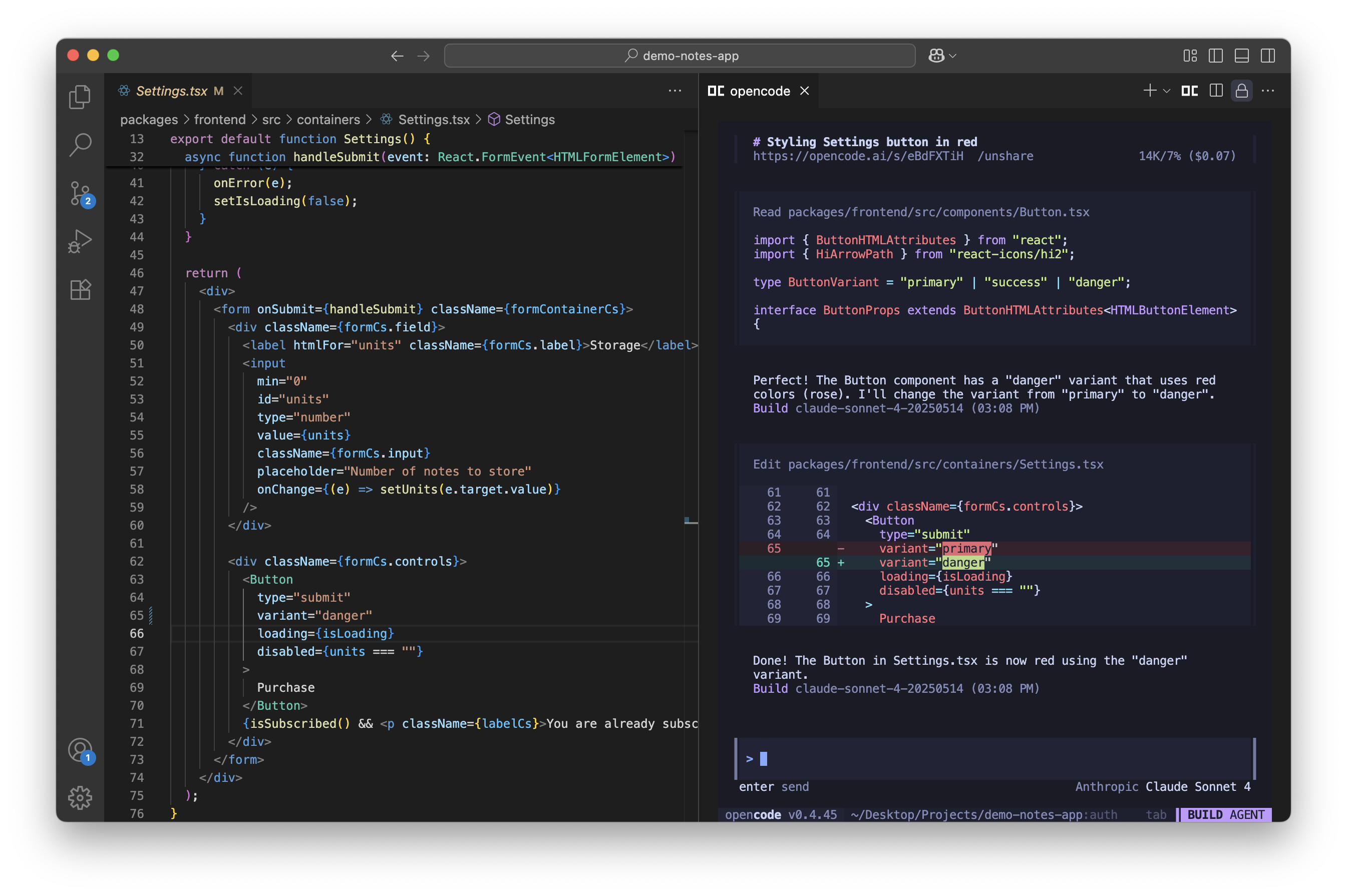
OpenCode does the same job as Cursor: you ask for a change, it reads your project, writes the code and runs the commands. The difference is that it forces neither an editor nor a model on you. It lives in your terminal, in an extension for VS Code, Cursor and Windsurf, or in a desktop app. On the model side it talks to more than 75 providers: Anthropic, OpenAI, Google, OpenRouter, GitHub Copilot, and models running on your own machine through Ollama, LM Studio or llama.cpp. Two agents ship with it and swap with one key: build edits your files, plan reads without touching anything. The code is MIT licensed. Before leaving Cursor, know that the desktop app is still in beta and that you pick and plug in the model yourself.
Versus Cursor: the match
Price
OpenCode
€0, the tool itself costs nothing
Cursor
€18/mo for one person
What you pay on top
OpenCode
Your tokens, as you use them
Cursor
Nothing, within the plan limits
The model
OpenCode
Yours: over 75 providers, or a local model
Cursor
The ones Cursor picked
| VS | OpenCode | Cursor ↗ |
|---|---|---|
| Price | €0, the tool itself costs nothing | €18/mo for one person |
| What you pay on top | Your tokens, as you use them | Nothing, within the plan limits |
| The model | Yours: over 75 providers, or a local model | The ones Cursor picked |
| Where it runs | Terminal, desktop app, or an extension in your editor | In their editor, a VS Code derivative |
| Your code | It goes to the model provider, and nowhere else | It also goes through Cursor's servers |
| Source code | MIT, to read and fork | Closed |
How to install it (even from zero)
One command to paste, and it is installed. No server, no Docker, no domain name. The real question comes right after: which model you plug in behind it. An API key, a subscription you already pay for, or a model running on your own machine. The prompt handles both steps.
- 1
Paste this prompt into Claude (Code or Desktop)
It installs OpenCode from the official project, walks you through the model choice, configures it and tests it on a real code folder:
Installe OpenCode sur ma machine en partant de zéro (l'agent de code open source, dépôt GitHub anomalyco/opencode). Détecte d'abord mon système d'exploitation, puis utilise la bonne méthode officielle : le script d'installation proposé sur opencode.ai, Homebrew avec le dépôt officiel de l'équipe sur Mac et Linux, Scoop ou Chocolatey sur Windows, ou npm si Node est déjà installé. Vérifie ensuite que la commande opencode répond et affiche sa version. Explique-moi alors le choix du cerveau, en deux options claires : une clé API chez un fournisseur comme Anthropic, OpenAI ou OpenRouter, et dans ce cas je paye ce que je consomme ; ou un modèle qui tourne sur ma machine avec Ollama ou LM Studio, gratuit mais limité par la puissance de mon ordinateur. Dis-moi laquelle convient à ma machine et à mon usage, puis configure celle que je choisis avec la commande de connexion prévue dans OpenCode, et écris le fichier opencode.json si c'est nécessaire. Termine par un test : place-toi dans un petit dossier de code, lance OpenCode, demande-lui de résumer le projet, et montre-moi que la réponse arrive et que le coût de la session s'affiche. Explique chaque étape simplement, je débute.

Review the GitHub repository and check whether it is safe to install given my machine and my infrastructure. Ask me as many questions as possible, using widgets, to clarify my request and be as precise as you can.
- 2
Choose what you pay for
Three routes. Your own API key with a provider, and you pay for tokens as you use them. A subscription you already have: ChatGPT Plus, GitHub Copilot and GitLab Duo connect with no setup. Or a local model through Ollama or LM Studio, free but weaker. One thing to know: Anthropic forbids using a Claude Pro or Max subscription inside OpenCode, and the plugins that allowed it were removed in version 1.3.0. With an Anthropic API key, on the other hand, everything works.
- 3
Keep it up to date
Two serious flaws were published in January 2026: a local server with no password that allowed running commands on the machine, and an injection in the web interface. Both were fixed in versions 1.0.216 and 1.1.10, and the current version is far ahead of those. Update often, this tool moves fast.
 Paste this prompt into Claude (Code or Desktop)
What you actually do with it
You code without switching editors
OpenCode opens in the terminal of VS Code or Cursor, picks up your selection and your open tab, and works inside your project. You migrate nothing and relearn nothing. If you prefer the bare terminal, it is the same thing without the editor around it.
You pick a model per task
A big model to think through architecture, a small cheap one for the rest. The cost of the session is displayed while it works, so you see where your money goes instead of discovering it on next month's invoice.
Sensitive code never leaves your machine
For a client project under a confidentiality agreement, you plug in a local model with Ollama or LM Studio. Nothing goes to a provider. It is slower and weaker than a big model, but there is no clause to get signed.
Project health, at a glance
Before installing an open-source tool, one question matters: is the project alive? These scores are computed from public GitHub data. They are not made up.
93/100
ExcellentVery active, well-maintained project: go ahead with confidence.
- Activity
- 100
Is the code moving? (commits in the last 30 days)
- Maintenance
- 100
How fresh is the latest update? Fresher is better.
- Community
- 100
Stars and contributors: people around means help and fixes.
- Maturity
- 70
Project age. Old enough to be solid, still alive.
- Momentum
- 97
Current pace versus its usual pace: speeding up or dozing off?
The repo in numbers
- GitHub stars
- 223.5k
- Forks
- 30k
- Contributors
- 452
- Commits
- 21.8k
- Project age
- 1.5 yrs
- Last commit
- today
- Size
- 603.3 MB
- License
- MIT
Built with
- TypeScript 81.8%
- MDX 14.5%
- CSS 2.4%
- Rust 0.9%
Scores computed automatically from the GitHub API (last-30-days activity, update freshness, community size, project age). Refreshed daily.

Loucash’s take
8/10
This is the serious alternative to Cursor, and it is genuinely free software. MIT license, over 200,000 stars, commits every day, a one command install. It runs in the terminal, in a desktop app still in beta, or inside your editor through an extension. And it talks to more than 75 model providers, from the biggest down to the one running on your own hard drive. The honest part: the tool is free, the tokens are not. Cursor charges you €18 a month and opens its tap. Here you pay for what you use, and one heavy day with a big model can cost more than a whole month of Cursor. The team sells two optional extras: Zen, usage based billing resold at cost, and Go, a €9 a month subscription for open models. Two more details matter. Anthropic forbids using a Claude Pro or Max subscription here, while ChatGPT Plus, GitHub Copilot and GitLab Duo connect with nothing to configure. And two serious flaws were fixed in January 2026, one of them a local server that allowed running commands: stay up to date, that part is not optional. Do not mix up the repos, three of them carry this name. The living project is anomalyco/opencode: it used to be sst/opencode before the team moved to the name Anomaly, and the old address redirects. Another repo, opencode-ai/opencode, has been archived since 2025 and its successor is called Crush, at Charm. Beyond that, this is for you if you already code with an agent and the closed subscription is starting to bother you.
It’s for you if: You code with Cursor or an equivalent agent, and you want to keep your editor, choose your model, and pay for what you use instead of a fixed subscription.
Also worth a look in the library
OpenBot
Agents & orchestration€86/moAI agents that each get their own computer: a real browser with their own logins, files and tools. The same idea as xAI's Grok Bot, except this one runs at home and costs nothing.
View details →
n8n
Agents & orchestration€27/moWire your tools together and let it run: when this happens, do that. Self-hosted, no task counter stopping you mid-month.
View details →
Paperclip
Agents & orchestration€26/moThe open source dashboard to run a team of AI agents: you hand them tasks like you would to colleagues, they work on their own on a schedule, and you approve what matters. The software is free; the AI is your Claude or ChatGPT subscription, or your API key.
View details →



One email a week that saves you money
Every Tuesday: the open source alternatives that just entered the library, what they replace and what they save you. One email, nothing more.
Free. One email on Tuesdays. Unsubscribe in one click. Your data


Join the Tuesday readers
