
Plasmic
NewThe free alternative toFramer

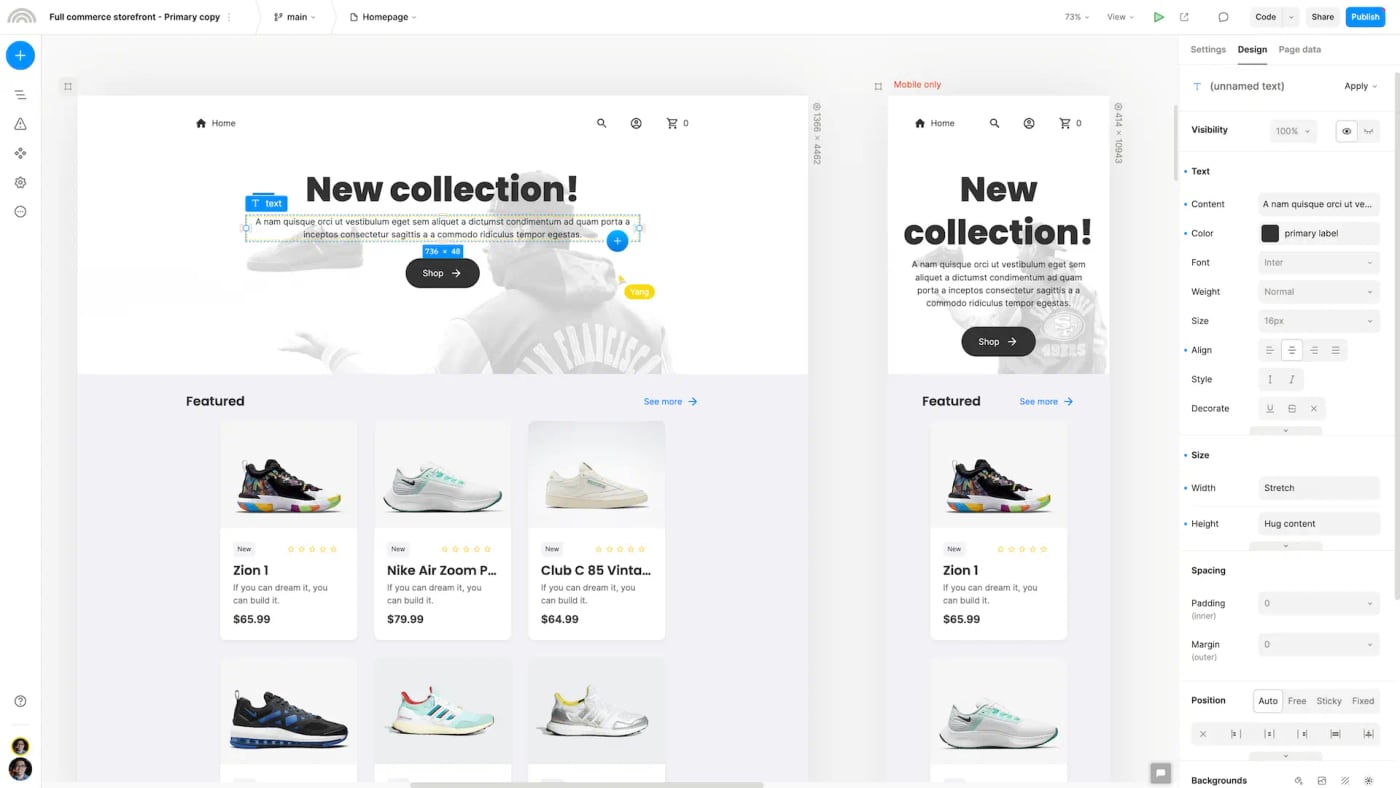
Plasmic is a visual editor for building websites and web apps with the mouse, like Framer, but open source: more than 7,000 stars on GitHub, an MIT licence for its tools and AGPL for the editor itself, and a company behind the project. You place your blocks on the page, set the desktop and mobile versions side by side, add animations and interactions, and you can import a Figma mockup or paste HTML. A built in CMS, with no limit on collections or entries, handles your content: blog, product pages, testimonials. The free plan is genuinely usable, with no time limit: unlimited projects, publishing on your own domain with their hosting, 3 collaborators, and exporting your site as React code to host wherever you want. Its limits: a Plasmic badge on the sites they host, no custom favicon, 14 days of version history, no AI, and no multilingual site, which is reserved for the Scale plan at 399 dollars a month. According to their plan grid, the badge only applies to their hosting: by exporting the site to Vercel, Netlify or your own server with Dokploy, you avoid it without paying. For developers, Plasmic goes further than Framer: you drag your own React components into the editor and embed the pages in an existing app. On the other hand, the editor runs on their cloud: the code is open and a Docker setup exists for development, but no official guide helps you host it yourself in production. And Framer stays ahead for heavily animated marketing sites, as Plasmic itself admits on its comparison page.
Versus Framer: the match
Price
Plasmic
€0, with no time limit
Framer
€15/month (Basic)
Your own domain
Plasmic
Included, even for free
Framer
From Basic
Sites
Plasmic
Unlimited projects
Framer
One plan per site
| VS | Plasmic | Framer ↗ |
|---|---|---|
| Price | €0, with no time limit | €15/month (Basic) |
| Your own domain | Included, even for free | From Basic |
| Sites | Unlimited projects | One plan per site |
| CMS | Unlimited collections and entries | 2 collections and 1,000 entries on Basic |
| Getting your code | React export, host it anywhere | No, the site stays at Framer |
| Multilingual site | Scale plan only (399 dollars) | Paid add-on |
| Animations | Yes, simpler ones | The market reference |
| Learning curve | More technical, built for developers | Very easy |
How to install it (even from zero)
No server to install: the editor runs on Plasmic's free cloud. The prompt builds your site, publishes it on your domain and, if you want, exports the code so you host it yourself.
- 1
Paste this prompt into Claude (Code or Desktop)
It guides you through the editor, publishes your site and, for a badge free site that is fully yours, exports it and deploys it to your server:
Aide-moi à créer mon site avec Plasmic, l'éditeur visuel open source qui remplace Framer (dépôt GitHub plasmicapp/plasmic, site plasmic.app). Je crée d'abord mon compte gratuit sur studio.plasmic.app. Ensuite, guide-moi pour partir d'un modèle ou importer ma maquette Figma, régler la version mobile et brancher le CMS pour mes contenus. Montre-moi comment publier le site sur mon nom de domaine avec l'hébergement Plasmic, et explique-moi les limites de l'offre gratuite (badge, 3 collaborateurs, 14 jours d'historique). Si je veux un site sans badge et totalement à moi, crée un projet Next.js avec l'outil officiel create-plasmic-app, relie-le à mon projet Plasmic (paquet @plasmicapp/loader-nextjs, ou génération de code avec @plasmicapp/cli), puis déploie-le sur mon serveur avec Dokploy ou sur Vercel, avec un nouveau déploiement automatique à chaque publication dans Plasmic. Explique chaque étape simplement, je débute.

Review the GitHub repository and check whether it is safe to install given my machine and my infrastructure. Ask me as many questions as possible, using widgets, to clarify my request and be as precise as you can.
- 2
Create your account, no credit card
The free plan does not expire and needs no credit card. You only move to a paid plan if you want to remove the badge on their hosting.
- 3
Think about languages before you start
If your site needs several languages, built in translation is reserved for the Scale plan. Otherwise, plan one page per language from the start.
 Paste this prompt into Claude (Code or Desktop)
What you actually do with it
Your marketing site with no subscription
Pages, CMS and your own domain for free, where Framer asks €15 a month as soon as you want your own domain.
A site that is really yours
You export the site as React code and host it wherever you want: if Plasmic changes its prices tomorrow, your site stays put.
Claude codes, you lay it out
Claude Code creates your React components (a calculator, a form, a map), and you place them with the mouse in your pages, without touching the code.
Project health, at a glance
Before installing an open-source tool, one question matters: is the project alive? These scores are computed from public GitHub data. They are not made up.
89/100
ExcellentVery active, well-maintained project: go ahead with confidence.
- Activity
- 100
- Maintenance
- 100
- Community
- 71
- Maturity
- 100
- Momentum
- 75
Is the code moving? (commits in the last 30 days)
How fresh is the latest update? Fresher is better.
Stars and contributors: people around means help and fixes.
Project age. Old enough to be solid, still alive.
Current pace versus its usual pace: speeding up or dozing off?
The repo in numbers
- GitHub stars
- 7k
- Forks
- 726
- Contributors
- 43
- Commits
- 7.9k
- Project age
- 5.6 yrs
- Last commit
- today
- Size
- 316.7 MB
- License
- MIT
Built with
- TypeScript 88.5%
- CSS 8.1%
- JavaScript 2.5%
Scores computed automatically from the GitHub API (last-30-days activity, update freshness, community size, project age). Refreshed daily.

Loucash’s take
7/10
Yes, Plasmic really is open source, and its free plan is the most generous I have seen for a site builder: your own domain, an unlimited CMS and code export, without paying. Framer does not even let you connect your domain on its free plan. What I like: you are never locked in. You publish with them to move fast, then you export the site and host it on your own server the day you want to take back control. Why 7 and not more: the editor is more technical than Framer, built to work with developers, and the animations go less far. The Plasmic badge stays on the sites they host, multilingual costs 399 dollars a month, and the editor itself runs on their cloud: the code is open, but no official guide helps you host it yourself.
It’s for you if: You want a marketing site or a small web app on your own domain with no subscription, and the option to take your code one day. If your site relies mostly on spectacular animations, or you want the simplest possible tool, Framer is still the best choice.
Also worth a look in the library
Snapzy
Content & social€25/moNewThe free native Mac app that replaces Screen Studio and CleanShot X: annotated screenshots, screen recordings, zooms that follow your mouse and nice backgrounds. Everything stays on your Mac, with no account and no subscription.
View details →
OpenCut
Content & social€24/moThe open source video editor that takes on CapCut: multitrack timeline, masks, keyframes, automatic captions, watermark free MP4 export, right in your browser. Your videos never leave your machine, and there is no account and no subscription.
View details →
Postiz
Content & social€20/moSchedule your posts and track your Instagram/TikTok stats, self-hosted. The others charge per channel AND per feature: this one is genuinely free.
View details →



One email a week that saves you money
Every Tuesday: the open source alternatives that just entered the library, what they replace and what they save you. One email, nothing more.
Free. One email on Tuesdays. Unsubscribe in one click.


Join the Tuesday readers
