
VoiceStudio
NewThe free alternative toElevenLabs

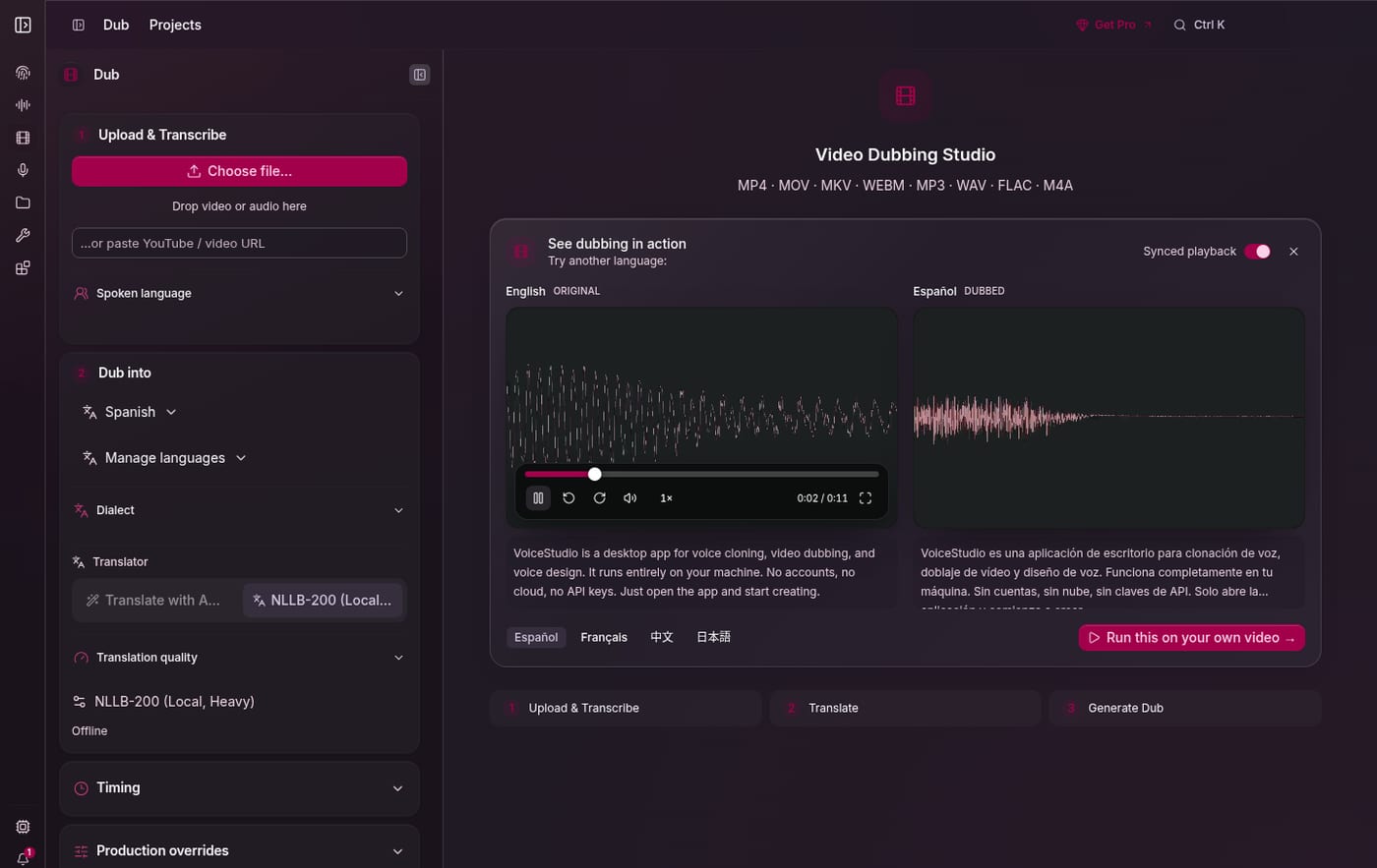
VoiceStudio is a full voice studio that runs on your computer: close to 40,000 stars on GitHub in under six months, several new releases a week, an AGPL licence. You record 5 to 15 seconds of your voice, nice and clean, and the app clones it: it then reads any text in your voice, in English, French and more than 600 other languages. It can also invent a voice from a simple description, dub a video while keeping the voice of each person speaking, transcribe, take dictation, isolate a voice from background music and produce audiobooks. No account, no API key, no counter: you generate as much as your machine allows. Usage statistics stay off until you turn them on, and every clip carries by default an inaudible watermark that flags it as AI generated, adjustable in the settings. The point to know before using it to make money: the app allows commercial use, but the voice model installed by default, OmniVoice, is only licensed for non commercial use. For your monetised videos, your ads or client work, install VoxCPM2 in one click from the model catalogue: Apache 2.0 licence, French included, cloning and voice design. On the hardware side, you need an Apple Silicon Mac (Intel Macs are not supported) or a PC, ideally with a 6 GB graphics card, and about ten gigabytes free. And as with any cloning app: only clone your own voice, or the voice of someone who gave you their consent.
Versus ElevenLabs: the match
Price
VoiceStudio
€0, no account
ElevenLabs
€23/month (Creator plan)
Minutes of speech
VoiceStudio
Unlimited, on your machine
ElevenLabs
About 2 hours a month, then per minute
Cloning your voice
VoiceStudio
5 to 15 seconds of audio are enough
ElevenLabs
Pro cloning included
| VS | VoiceStudio | ElevenLabs ↗ |
|---|---|---|
| Price | €0, no account | €23/month (Creator plan) |
| Minutes of speech | Unlimited, on your machine | About 2 hours a month, then per minute |
| Cloning your voice | 5 to 15 seconds of audio are enough | Pro cloning included |
| Dubbing a video | Included, with each speaker's voice | Included, taken from your credits |
| Commercial use | Yes, with an open model like VoxCPM2 | Yes, from Starter |
| Your voice | Never leaves your machine | Sent to their servers |
| What you need | An Apple Silicon Mac or a good graphics card | A browser |
How to install it (even from zero)
A desktop app to download, then voice models weighing several gigabytes. The prompt checks that your machine can keep up, installs everything from the official repo and adds a model you can use for content that earns money.
- 1
Paste this prompt into Claude (Code or Desktop)
It checks your machine, installs the app from the official repo, adds an openly licensed model and clones your voice for a first test:
Installe VoiceStudio sur ma machine : c'est le studio de voix open source qui remplace ElevenLabs (dépôt GitHub debpalash/VoiceStudio, site voicestudio.sh). Suis le guide prévu pour les agents dans le dépôt, docs/install/agent.md. Vérifie d'abord que ma machine suit : un Mac Apple Silicon sous macOS 13.3 ou plus récent (les Mac Intel ne sont pas pris en charge), ou un PC Windows ou Linux, idéalement avec une carte graphique d'au moins 6 Go, et une dizaine de gigas libres. Télécharge ensuite la dernière version de l'app de bureau depuis github.com/debpalash/VoiceStudio/releases (le fichier VoiceStudio-Electron qui correspond à mon système), installe-la et lance-la ; sur Mac, montre-moi comment autoriser son ouverture au premier lancement. Avant chaque téléchargement de modèle, donne-moi sa taille et sa licence. Je veux pouvoir utiliser ma voix dans des contenus qui rapportent de l'argent : le modèle par défaut, OmniVoice, n'est autorisé qu'en usage non commercial, alors installe aussi VoxCPM2 depuis le catalogue de modèles de l'app (licence Apache 2.0, il parle français) et explique-moi quand utiliser l'un ou l'autre. Laisse les statistiques d'usage désactivées. Si tu tournes dans Claude Code, ajoute la compétence du projet avec npx skills add debpalash/VoiceStudio pour pouvoir piloter l'app pour moi ensuite. Enfin, aide-moi à enregistrer 15 secondes de ma voix dans un endroit calme, clone-la, et génère une phrase de test en français pour vérifier que tout marche. Explique chaque étape simplement, je débute.

Review the GitHub repository and check whether it is safe to install given my machine and my infrastructure. Ask me as many questions as possible, using widgets, to clarify my request and be as precise as you can.
- 2
Take care of your voice sample
5 to 15 seconds of clean speech, with no music or echo, on your usual microphone. The quality of the clone depends mostly on this recording.
- 3
Pick the model for the job
OmniVoice, installed by default, for your tests and personal projects. VoxCPM2 as soon as the audio goes into a monetised video, an ad or client work.
 Paste this prompt into Claude (Code or Desktop)
What you actually do with it
Your voiceovers with no minute counter
Even ElevenLabs' Creator plan, at €23 a month, stops at about 2 hours of speech. Here you redo a take as many times as you want: the only limit is your machine.
Your videos in another language, in your voice
You drop in a video or paste a YouTube link: the app transcribes, translates, then has you speak Spanish or French with your own voice.
Claude drives your voiceovers
The app exposes a local API compatible with OpenAI's and an MCP server: Claude can turn your scripts into audio without you touching the app.
Project health, at a glance
Before installing an open-source tool, one question matters: is the project alive? These scores are computed from public GitHub data. They are not made up.
86/100
ExcellentVery active, well-maintained project: go ahead with confidence.
- Activity
- 100
- Maintenance
- 100
- Community
- 89
- Maturity
- 40
- Momentum
- 100
Is the code moving? (commits in the last 30 days)
How fresh is the latest update? Fresher is better.
Stars and contributors: people around means help and fixes.
Project age. Old enough to be solid, still alive.
Current pace versus its usual pace: speeding up or dozing off?
The repo in numbers
- GitHub stars
- 39.4k
- Forks
- 4.7k
- Contributors
- 71
- Commits
- 3.4k
- Project age
- 0.5 yrs
- Last commit
- today
- Size
- 112.7 MB
- License
- AGPL-3.0
Built with
- Python 55.3%
- JavaScript 23.7%
- TypeScript 18.5%
- Shell 0.7%
- Rust 0.7%
Scores computed automatically from the GitHub API (last-30-days activity, update freshness, community size, project age). Refreshed daily.

Loucash’s take
7/10
What I wanted to know was whether you can really clone yourself for free. The answer is yes: locally, with no account and no counter. A few seconds of your voice are enough, and the same tool dubs your videos into other languages while keeping your voice. At ElevenLabs, Starter stops at 30 minutes a month and it takes €23 a month for about 2 hours: it is not the same scale. What I like: everything stays on my machine, no account, and the local API lets Claude turn my scripts into voiceovers. Why 7 and not more: the project is under six months old and ships several releases a week, so expect to run into bugs. It needs a solid machine, an Apple Silicon Mac or a good graphics card. And the trap is in the licence: the model installed by default is limited to non commercial use. For anything that earns you money, switch to VoxCPM2, and check a model's licence before using it. ElevenLabs stays simpler: nothing to install, everything happens in the browser.
It’s for you if: You make voiceovers, videos or audiobooks, you have an Apple Silicon Mac or a PC with a good graphics card, and you want to stop counting your minutes. If you just want a clean voice without installing anything, or if your computer is old, stay on ElevenLabs.
Also worth a look in the library
Cue
Voice & transcription€17/moAn AI copilot floating over your screen: it sees what you see, hears your meeting, and whispers what to answer in real time. Invisible in screen shares.
View details →
Meetily
Voice & transcription€15/moYour meeting assistant running 100% on your machine: it listens, transcribes live and writes the summary. No recording ever goes to the cloud.
View details →
OpenWhispr
Voice & transcription€12/moDictate into any app with one key: your words appear right where your cursor is. Transcription can run fully on-device, your audio never leaves your machine.
View details →

One email a week that saves you money
Every Tuesday: the open source alternatives that just entered the library, what they replace and what they save you. One email, nothing more.
Free. One email on Tuesdays. Unsubscribe in one click.


Join the Tuesday readers
