
Kan
NewThe free alternative toTrello

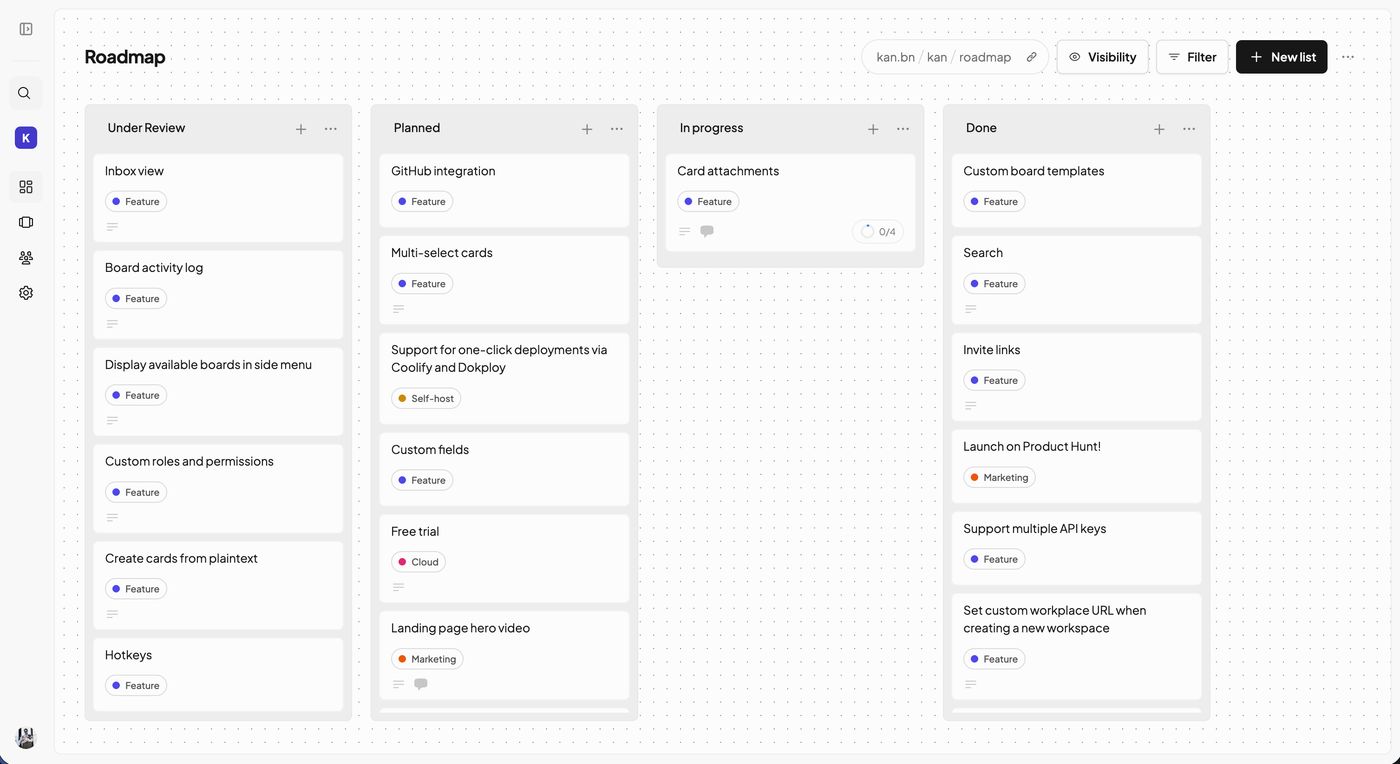
Kan takes what made Trello work and stops there: boards, lists, cards you drag around. On each card, labels, a checklist, a due date, attachments, comments and a history of what changed. On top come reusable board templates, filters, a calendar view that Trello keeps for its Premium plan, and an interface translated into French. Moving over does not mean retyping everything: you connect your Trello account in the settings, pick the boards to bring along, and they arrive with their lists, their cards and descriptions, their labels and checklists. Comments, attachments and due dates stay behind. The project is young, started in late 2023, but alive: close to 5,700 stars on GitHub, around fifty contributors, an AGPL-3.0 licence and several updates a week. It even ships an MCP server: Claude can read your boards, create cards and move them for you. Two ways to use it. Online at kan.bn it is free for one person; to work as a team, the Teams plan costs about €7 per member per month. On your own server with Docker, everything is unlocked and the number of members is no longer capped. What is missing against Trello: no mobile app, only the website adapting to the phone, no Butler style automations, and integrations with other tools are announced but not there yet.
Versus Trello: the match
Price
Kan
€0 on your server, free online for one person
Trello
€5/month per person, €11 on Premium
Number of boards
Kan
Unlimited
Trello
10 per workspace on the free plan
Team members
Kan
Unlimited on your server
Trello
10 at most for free, then each one is paid
| VS | Kan | Trello ↗ |
|---|---|---|
| Price | €0 on your server, free online for one person | €5/month per person, €11 on Premium |
| Number of boards | Unlimited | 10 per workspace on the free plan |
| Team members | Unlimited on your server | 10 at most for free, then each one is paid |
| Calendar view | Included on your server | Premium plan, €11/month |
| Driving your cards from Claude | MCP server included | No, only the in house AI on Premium |
| Where your boards live | Their cloud, or your server with Docker | Atlassian's cloud |
| Mobile app | No, the website adapts to the phone | Yes, iPhone and Android |
| Automations | Not yet | Yes, 250 runs a month for free |
How to install it (even from zero)
On your own, a free account on kan.bn is enough, nothing to install. As a team, your server is where Kan becomes free for everyone: the prompt does the Docker install, then the import of your Trello boards.
- 1
Paste this prompt into Claude (Code or Desktop)
It asks whether you are alone or a team, installs Kan, then brings your Trello boards over:
Je veux remplacer Trello par Kan, l'alternative open source (dépôt GitHub kanbn/kan, site kan.bn). Demande-moi d'abord si je l'utilise seul ou en équipe, et combien nous sommes. Seul, aide-moi à créer un compte gratuit sur kan.bn. En équipe, installe Kan sur mon serveur avec le docker-compose officiel du dépôt kanbn/kan : dis-moi ce qu'il faut comme machine, génère le secret BETTER_AUTH_SECRET et le mot de passe de la base, règle NEXT_PUBLIC_BASE_URL sur mon domaine, configure l'envoi des mails pour les invitations et explique-moi comment sauvegarder la base. Ensuite, reprends mes tableaux Trello : si Kan tourne sur mon serveur, guide-moi pour créer une clé d'API Trello et la renseigner dans TRELLO_APP_API_KEY et TRELLO_APP_API_SECRET, puis connecte mon compte Trello dans les réglages de Kan et importe mes tableaux. Dis-moi ce qui passe à l'import (listes, cartes, descriptions, étiquettes, checklists) et ce qui reste chez Trello (commentaires, pièces jointes, échéances), et vérifie avec moi un tableau importé. Enfin, branche le serveur MCP de Kan (npx -y @kan/mcp, avec KAN_BASE_URL et une clé d'API créée dans les réglages de Kan) pour que tu puisses lire et modifier mes cartes.

Review the GitHub repository and check whether it is safe to install given my machine and my infrastructure. Ask me as many questions as possible, using widgets, to clarify my request and be as precise as you can.
- 2
Import a single board to start
Take your most used board and work on it for a week before moving the rest. You will quickly see whether the comments or due dates left in Trello are missed.
- 3
Invite your team
On your server, members are no longer paid one by one: one invite link and everyone is in.
 Paste this prompt into Claude (Code or Desktop)
What you actually do with it
Your Trello boards, without the bill
The import brings lists, cards, labels and checklists. You find your setup again in minutes, without retyping anything.
The whole team at the same price: zero
At Trello, every extra member is paid for. On your server, Kan takes as many people as you want, calendar view included.
Your cards driven by Claude
The built in MCP server lets Claude read your boards, create cards and move them. You describe the task, it lands in the right list.
Project health, at a glance
Before installing an open-source tool, one question matters: is the project alive? These scores are computed from public GitHub data. They are not made up.
90/100
ExcellentVery active, well-maintained project: go ahead with confidence.
- Activity
- 100
- Maintenance
- 100
- Community
- 72
- Maturity
- 80
- Momentum
- 100
Is the code moving? (commits in the last 30 days)
How fresh is the latest update? Fresher is better.
Stars and contributors: people around means help and fixes.
Project age. Old enough to be solid, still alive.
Current pace versus its usual pace: speeding up or dozing off?
The repo in numbers
- GitHub stars
- 5.7k
- Forks
- 486
- Contributors
- 53
- Commits
- 859
- Project age
- 2.9 yrs
- Last commit
- today
- Size
- 70.1 MB
- License
- AGPL-3.0
Built with
- TypeScript 95.8%
- PLpgSQL 2.2%
- MDX 1.1%
- JavaScript 0.6%
Scores computed automatically from the GitHub API (last-30-days activity, update freshness, community size, project age). Refreshed daily.

Loucash’s take
7/10
Kan does one thing and does it well: Trello style boards, fast and clean, without everything Atlassian has piled on over the years. For a small team paying for Trello Standard or Premium, the saving is immediate once it runs on a server: no more bill per member, and the calendar view is included while Trello sells it as Premium. What I like: the Trello import, which saves retyping everything, and the MCP server. Telling Claude "create a card to chase this client on Friday" and seeing it land on the right board is exactly the bridge between your tools and AI that I am after. What may bite: the project is young and less complete than Trello. No mobile app, no automations, no integrations yet. Comments and attachments do not come over in the import. And online, the free plan only covers one person: for a team, it is your server or the paid plan.
It’s for you if: You pay for Trello for a small team, you have a server or are ready to rent one, and your boards are enough without automations. If your team lives in Trello's mobile app or in its automations, keep Trello.
Also worth a look in the library
ERPNext
Business & clients€38/moNewThe open source ERP that replaces Sage: accounting, invoicing, purchasing, sales, stock, manufacturing, projects and CRM in one tool. Free on your own server, with no per user licence, and a French extension for the FEC and VAT.
View details →
Formbricks
Business & clients€35/moYour forms and surveys, hosted at home, with no response cap. Typeform shuts the tap at 100 responses a month; here there is no tap.
View details →
HeyForm
Business & clients€35/moThe open source Typeform-style form builder, one question at a time, hosted on your own server. Surveys, quizzes, contact forms, payments: your answers stay in your database, with no cap.
View details →



One email a week that saves you money
Every Tuesday: the open source alternatives that just entered the library, what they replace and what they save you. One email, nothing more.
Free. One email on Tuesdays. Unsubscribe in one click.


Join the Tuesday readers
