Yogurt
NewThe free alternative toGranola

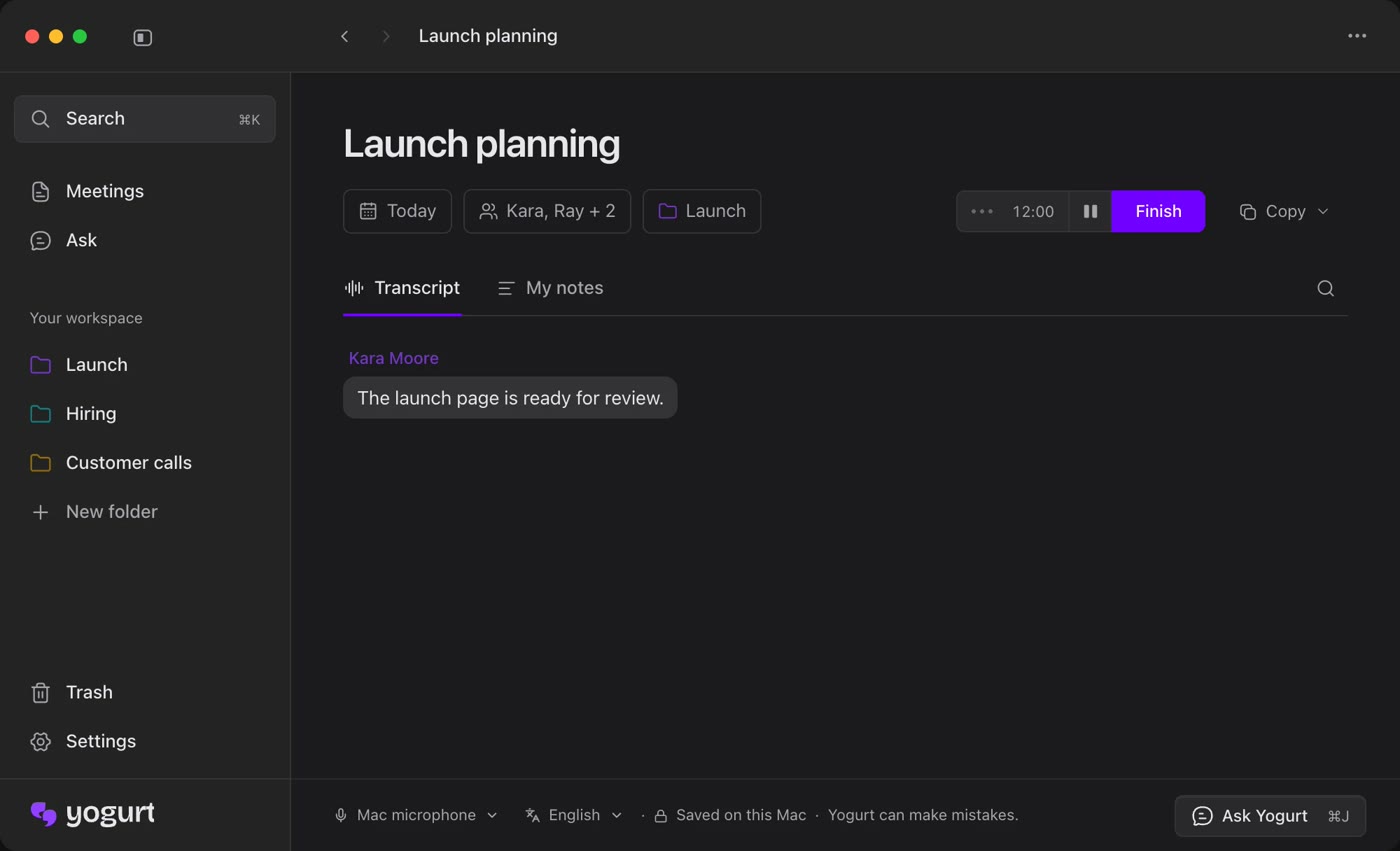
Yogurt is an open source AI meeting notepad that replaces Granola: it records your microphone and the call audio, with no bot in the meeting, and transcribes live. At the end, it writes the summary and everyone's next steps, next to your own notes, and you can ask it questions about all your meetings, with the source. Folders, search, Markdown export and 99 languages. Everything runs on your computer, Mac, Windows or Linux: transcription and AI stay with you, with no account, under the MIT license. A local MCP server hands your notes to Claude or Cursor. The limit: summary quality depends on your machine's power (8 GB of memory at least), and there is no mobile app.
Versus Granola: the match
Price
Yogurt
€0, no account
Granola
€13/month per person (Business)
Meeting history
Yogurt
Unlimited, on your computer
Granola
Limited when free, unlimited on Business
Bot in the call
Yogurt
None, it listens to your computer
Granola
None either
| VS | Yogurt | Granola ↗ |
|---|---|---|
| Price | €0, no account | €13/month per person (Business) |
| Meeting history | Unlimited, on your computer | Limited when free, unlimited on Business |
| Bot in the call | None, it listens to your computer | None either |
| Where your meetings go | Nowhere: everything stays on your machine | On their servers |
| MCP for Claude or Cursor | Included, locally | Business plan only |
| Platforms | Mac, Windows, Linux | Mac, Windows, iPhone, Android |
How to install it (even from zero)
A desktop app to download, like Granola, free and with no account. On first launch, it downloads its AI models: keep some room on your disk. The prompt installs it from the official repo and sets it up for your meetings in your language.
- 1
Paste this prompt into Claude (Code or Desktop)
It installs Yogurt from the official repo, sets up permissions and language, and can connect it to Claude over MCP:
Installe Yogurt sur mon ordinateur : c'est le bloc-notes de réunion par l'IA, open source et local, qui remplace Granola (dépôt GitHub FrigadeHQ/yogurt). Vérifie d'abord que mon ordinateur est compatible : un Mac Apple Silicon sous macOS 14.4 ou plus, un PC Windows 10 (version 2004 ou plus) en 64 bits, ou un Linux 64 bits type Ubuntu 22.04, avec au moins 8 Go de mémoire. Télécharge la dernière version depuis les releases officielles du dépôt (le .dmg sur Mac, le .exe sur Windows, l'AppImage sur Linux), installe-la et ouvre-la. Guide-moi pour autoriser le micro et l'audio de l'appel (sur Mac : Enregistrement de l'écran et de l'audio système), puis laisse-la télécharger ses modèles. Comme mes réunions sont en français, règle la langue parlée sur Multi-language et la langue des résumés sur le français. Fais un court test : enregistre une minute, puis vérifie la transcription et le résumé. Si je le veux, active ensuite l'accès dans Settings, AI apps, et ajoute la commande qu'il donne comme serveur MCP local dans Claude Desktop. Rappelle-moi de prévenir les participants quand j'enregistre un appel. Explique chaque étape simplement, je débute.

Review the GitHub repository and check whether it is safe to install given my machine and my infrastructure. Ask me as many questions as possible, using widgets, to clarify my request and be as precise as you can.
- 2
Tell the other participants
Yogurt adds no bot to the call: nobody is told automatically. Say it at the start of the meeting, before you record.
- 3
MCP, only if you need it
An app connected over MCP, like Claude Desktop, may send what it reads to its own online model. Access is off by default, and you can turn it off again anytime.
 Paste this prompt into Claude (Code or Desktop)
What you actually do with it
Notes without taking notes
Yogurt transcribes the call live and writes the summary at the end, with everyone's next steps.
Ask what you missed
Ask a question about one or several meetings: the answer links to the exact passage.
Your meetings in Claude
With the local MCP server, Claude Desktop or Cursor read your notes and transcripts to draft an email or a proposal.
Project health, at a glance
Before installing an open-source tool, one question matters: is the project alive? These scores are computed from public GitHub data. They are not made up.
65/100
GoodHealthy, followed project: a good everyday choice.
- Activity
- 100
Is the code moving? (commits in the last 30 days)
- Maintenance
- 100
How fresh is the latest update? Fresher is better.
- Community
- 58
Stars and contributors: people around means help and fixes.
- Maturity
- 40
Project age. Old enough to be solid, still alive.
- Momentum
- 27
Current pace versus its usual pace: speeding up or dozing off?
The repo in numbers
- GitHub stars
- 2.5k
- Forks
- 183
- Contributors
- 8
- Commits
- 340
- Project age
- 0 yrs
- Last commit
- 5 d ago
- Size
- 15.7 MB
- License
- MIT
Built with
- TypeScript 80%
- CSS 6.4%
- JavaScript 4.7%
- Rust 4.6%
- Swift 1.9%
Scores computed automatically from the GitHub API (last-30-days activity, update freshness, community size, project age). Refreshed daily.

Loucash’s take
8/10
Yogurt is Granola for free, on your computer: it records the call with no bot, transcribes live, then writes a clear summary with everyone's next steps. You can even ask it questions about your past meetings. What I like: nothing leaves your machine, there is no account and no subscription, and the local MCP server, which Granola keeps for its Business plan, is free. Your meetings become a memory Claude can read. The limit to know: the summary comes from an AI running on your machine, so its quality depends on your computer, and there is no mobile app. The project is also very young: expect frequent updates. My advice: if you run a lot of video calls, install it and compare it with Granola for a week before you cancel.
It’s for you if: You run back to back client or team calls and want their notes and next steps without paying for Granola, or sending your meetings to a server.
Also worth a look in the library
VoiceStudio
Voice & transcription€23/moThe open source voice studio that replaces ElevenLabs: clone your voice from a few seconds of audio, have it read your scripts or dub your videos into another language. Everything runs on your machine, with no account and no minute counter.
View details →
Cue
Voice & transcription€18/moAn AI copilot floating over your screen: it sees what you see, hears your meeting, and whispers what to answer in real time. Invisible in screen shares.
View details →
Meetily
Voice & transcription€15/moYour meeting assistant running 100% on your machine: it listens, transcribes live and writes the summary. No recording ever goes to the cloud.
View details →


One email a week that saves you money
Every Tuesday: the open source alternatives that just entered the library, what they replace and what they save you. One email, nothing more.
Free. One email on Tuesdays. Unsubscribe in one click. Your data


Join the Tuesday readers